
The best beta censor apps and extensions in 2026, compared
Five tools that cover nudity while you browse, with their real prices and limits. Data checked on their official websites and store listings on 21 October 2026.
Updated October 21, 2026
Beta censorship (also called beta safe browsing) means browsing with sexual content covered instead of seeing it in full. For years people did it by hand, with edited screenshots or with sites that posted pre-censored images. Today there are programs that do it on their own, live, on whatever shows up on your screen.
This guide compares the five options people mention most: Serenfix (ours), DeniedPixels, Beta Blocker by Isla2D, BetaPixels and HaramBlur. Every figure comes from what their makers publish, so you can choose without installing all of them.
Quick comparison
| Tool | Where it runs | What it covers | Price |
|---|---|---|---|
| Serenfix | Chrome, Edge, Brave and Opera on desktop | Each body part separately, by sex, in photos; video and GIFs with Premium | Free for photos. Premium: $3.99/month or $40.70/year |
| DeniedPixels | Chrome and Firefox; Safari on iPhone; Lemur and Quetta on Android | Body parts in photos for free; GIFs with Basic; video with Premium | Free. Basic: $5/month or $49/year. Premium: $10/month or $99/year |
| Beta Blocker (Isla2D) | Windows 10/11 app and Android 14+ app | Everything on screen, in any program | One-time: from $19.99 (Windows), from $12.99 (Android), $25 for both |
| BetaPixels | Safari on iPhone | Photos and videos in Safari; exports censored videos | See the App Store |
| HaramBlur | Chrome and Firefox | Blurs the whole image when it detects nudity or faces | Free and open source |
Serenfix
A Chrome extension that also works in other Chromium browsers. It detects each body part on its own (face, chest, nipples, genitals, underwear, buttocks, feet) and tells women and men apart, so you can, for example, cover women’s chests and leave men untouched. Styles: pixelate, blur, black box, oval and animated words (CENSORED, DENIED, LOSER).
The free plan censors photos on any website, with every filter and style, with no time limit. Premium adds video and GIFs. On video, Serenfix shows each frame with a small delay so it has already been analysed before you see it, and covers again at every scene cut. That avoids the usual flash where a frame slips through uncensored.
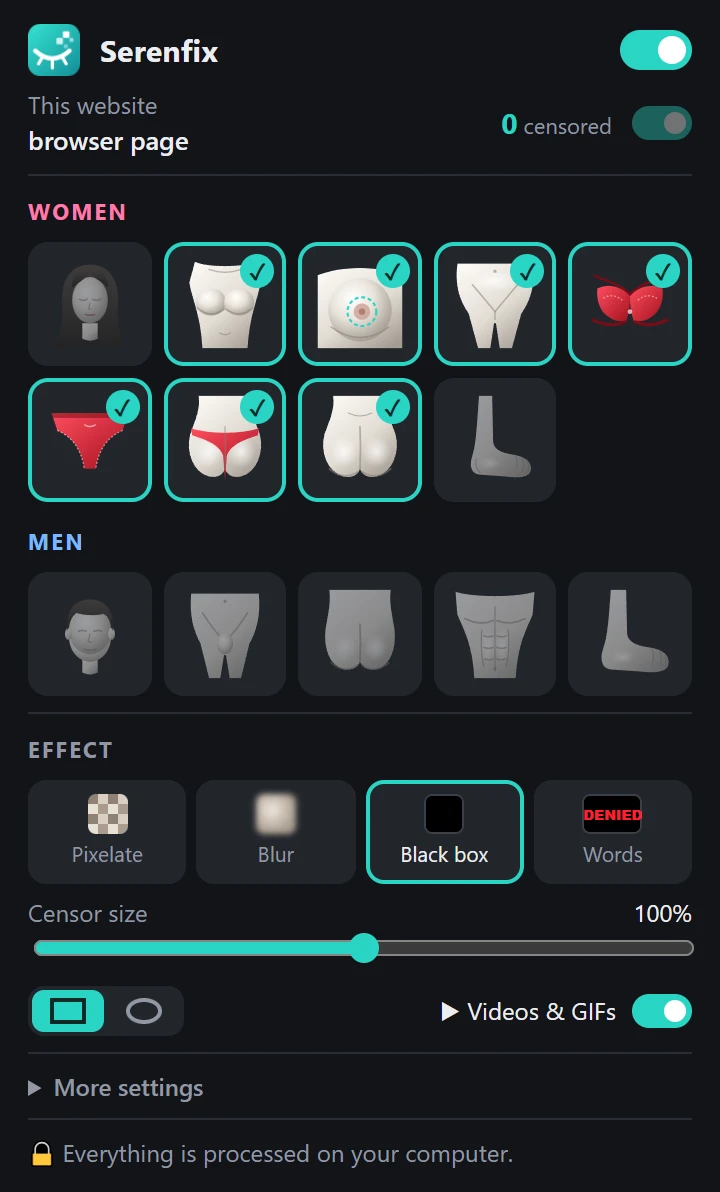
Limits: no mobile or Firefox version yet, and no game modes such as self-lock or remote control.
DeniedPixels
The option with the most platforms: Chrome and Firefox extensions, an iPhone app (inside Safari) and support for two Android browsers. Its free plan already includes per-body-part censoring, 11 static styles, silhouettes, site blocking and the Self Lock and Decay modes. GIFs and animated styles are in Basic, and video only comes with Premium ($10 a month), together with shared remote control and modes such as Beta TV or Red / Green Light.
It fits if you want the game modes and shared control, or need it on your phone. If you mainly want video at the lowest price, it is the expensive route.
Beta Blocker (Isla2D)
Not an extension: it is a Windows program and an Android app that capture the whole screen and draw boxes over what they detect. The upside is that it works in any program (browsers, video players, social apps) and, on Windows, across every monitor. It can also record and export censored videos and has modes such as reverse censoring.
You pay once, from $19.99 on Windows and from $12.99 on Android (Android 14 or later required), and you buy it on itch.io rather than an app store. Because it works on the full screen it uses more resources than an extension, and its homepage is the creator’s link page rather than a product site.
BetaPixels
An iPhone app that adds a Safari extension to censor photos and videos while you browse, with styles such as black bar, pixelate, redacted and glitch. It also lets you watch your own videos censored and export them. It launched in June 2026 and still has very few ratings, so try it before paying for anything.
HaramBlur
Built for a different need: avoiding inappropriate images for religious reasons. It is free, open source and runs on Chrome and Firefox. It detects nudity and faces, and lets you choose which sex’s faces get blurred. The difference from the rest is that it blurs the entire image, not specific areas, so it won’t help if you want to see a photo with only some parts covered.
Which one should you pick?
- Desktop browsing with photos and video at the lowest price: Serenfix. Photos are free and video is $3.99 a month.
- You need your phone or the game modes: DeniedPixels.
- You want everything on screen covered, outside the browser too: Beta Blocker.
- iPhone only: BetaPixels or DeniedPixels.
- Something free that blurs whole images: HaramBlur.
They all use similar detection models and none of them is right 100% of the time. What really differs is where they run, what they cover and how they handle video. If one doesn’t convince you, try another one’s free plan before paying.
Frequently asked questions
What is beta censorship?
It is the preference for seeing sexual content covered instead of in full: pixelated, behind black boxes or under words. Beta censor apps do that covering automatically, with an AI that detects body parts.
Is there a beta censor extension for Chrome?
Yes. Serenfix and DeniedPixels are Chrome extensions that censor specific body parts in photos and videos on any website. HaramBlur also runs on Chrome, but it blurs the whole image.
Which is the cheapest option with video?
Serenfix Premium costs $3.99 a month and includes video and GIFs. On DeniedPixels, video is part of the Premium plan at $10 a month. Beta Blocker is a one-time payment (from $19.99 on Windows), but it only works through its desktop or Android app.
Do these apps upload my images?
All five say they process everything on your device. In Serenfix, detection is done by an AI that runs inside your browser, and no image leaves your computer.
Do they work on phones?
Serenfix is desktop-only for now. DeniedPixels has a Safari version for iPhone and supports some Android browsers, Beta Blocker has an Android app for Android 14 and later, and BetaPixels is an iPhone app.